
A law firm in Toronto. Client anonymized at the firm’s request.
Meeting with the managing partner at a law firm in Toronto, and the firm’s tech lead, I realized they were already on the path to AI adoption. I was surprised.
I had walked in ready to do the usual scan. Readiness. Risks. A long list of possible projects. I still think that is the right start when a firm has ambition and almost no platform. Here they already had a game plan. The tech lead and the team had been building a CRM. An HTML backbone tied to a working spreadsheet, with people, files, and parties already linked. The managing partner was thinking about how the firm should run, not how to sprinkle a chatbot on old habits.
After that conversation the work got simpler, in a good way. Help them boost a module in the CRM they already had: a Lead Generator, with a local model, so campaign targeting and cross-sell could run on their own data. Something staff could open. Something we could grow later.
The vehicle was half-built. My job was the next foothold, not a tour of every possible AI idea.
Law firms cannot treat client data casually. I kept the work on their machine and network on purpose. Campaign search did not need thousands of client rows shipped to a public cloud model.
My first MVP draft assumed a new data layer. SQLite, document ingest, a local RAG stack. After I saw their materials, that draft was the wrong one. They already had a book of record. Version two was simpler: respect the HTML and spreadsheet backbone, and add a focused module on top of it.
In practice:
The firm’s relationship data stays on the firm’s side. I have found that is often what lets a managing partner say yes to a pilot.
I have seen AI pilots start on a green field and ignore the systems people already use. We treated the CRM as the base layer: person IDs linked to file history, matter types, closing dates, the relationships that make a real estate practice run. The Lead Generator does not replace that backbone. It sits beside it in the same shared folder.
Staff can open it, run campaigns, export call lists. When the data under it improves (email, consent, household links, will-on-file flags), the module gets smarter without a rewrite of the firm’s strategy.
You attach the first module to the system that will eventually be how the business is run. You pick something that pays for itself now, and you leave the door open.
I will say this carefully, because hype helps no one. I think the CRM can become the operating system of the firm. Reception, lawyers, marketing, eventually billing, all touching the same records. A chatbot on the website, by itself, does not do that.
A front desk that can pull a record and validate a caller with a phone number plus something only the client should know. Invoices that draft from matter data instead of retyping names. None of that works if the CRM is a messy spreadsheet nobody trusts.
We left them a plain-language CRM roadmap. Trust the data in the next few months. Move staff typing off the spreadsheet by about six. Start invoices and a front-desk pilot around a year. Aim for one backbone over two years. Those are planning targets. I am not promising dates. The point, for me, is less admin drag so the firm can spend time on how clients are actually looked after.
Two modes in daily work.
AI Search: type who you want in plain English. Filtered Search: rules-based recommendations with a short rationale per person. Recent purchase, life stage, refinance. A reason that fits this client, not a generic mail blast.
After setup, staff double-click a launcher and work in the browser. No PowerShell on a Tuesday. Lists export to CSV so someone else can make the calls. Recent Queries sit at the bottom of AI Search so a useful search is not lost the next morning.
A lawyer still reviews before anyone is contacted. Campaign lists also have to stay inside the firm’s privacy rules and CASL. The software does not get to skip that.
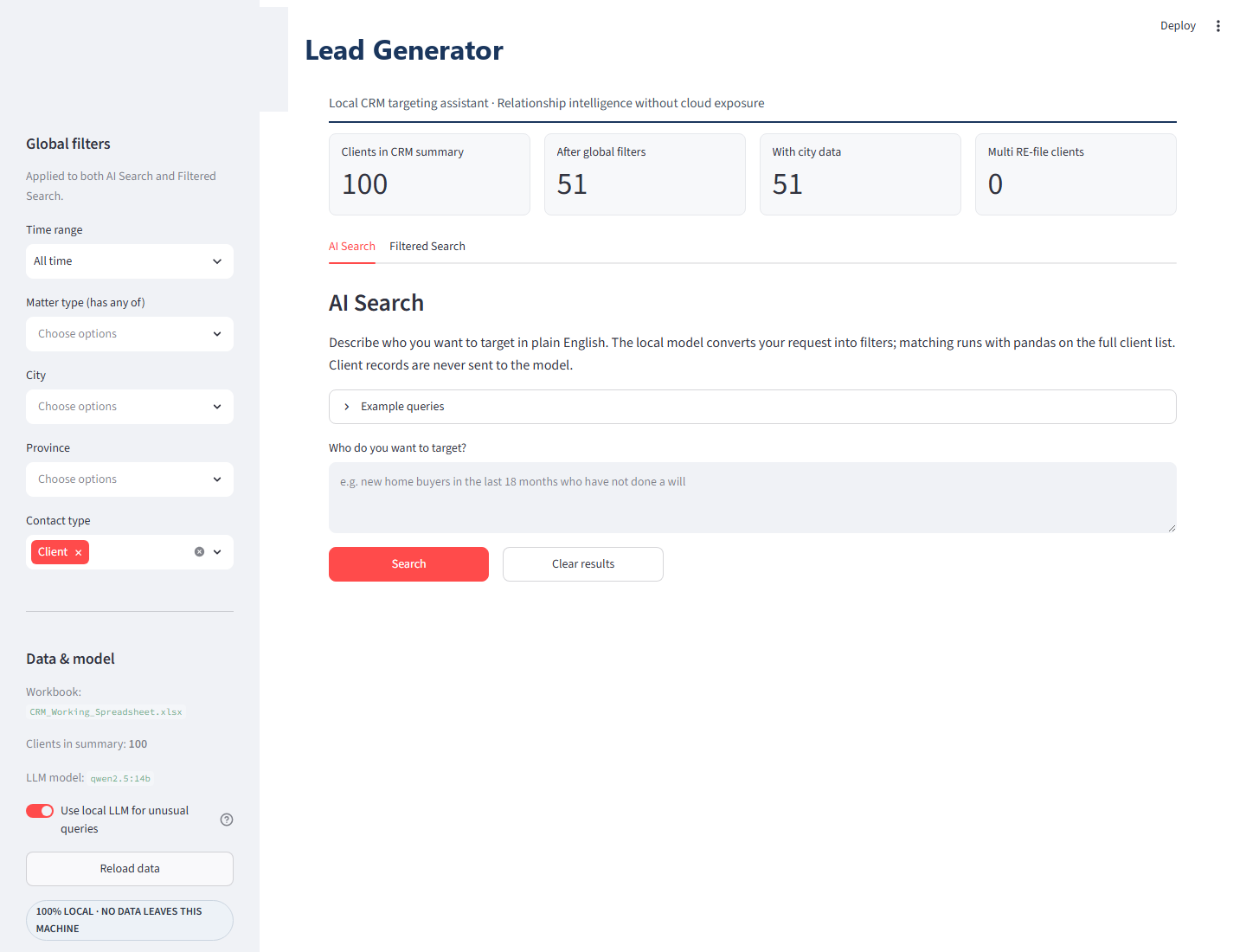
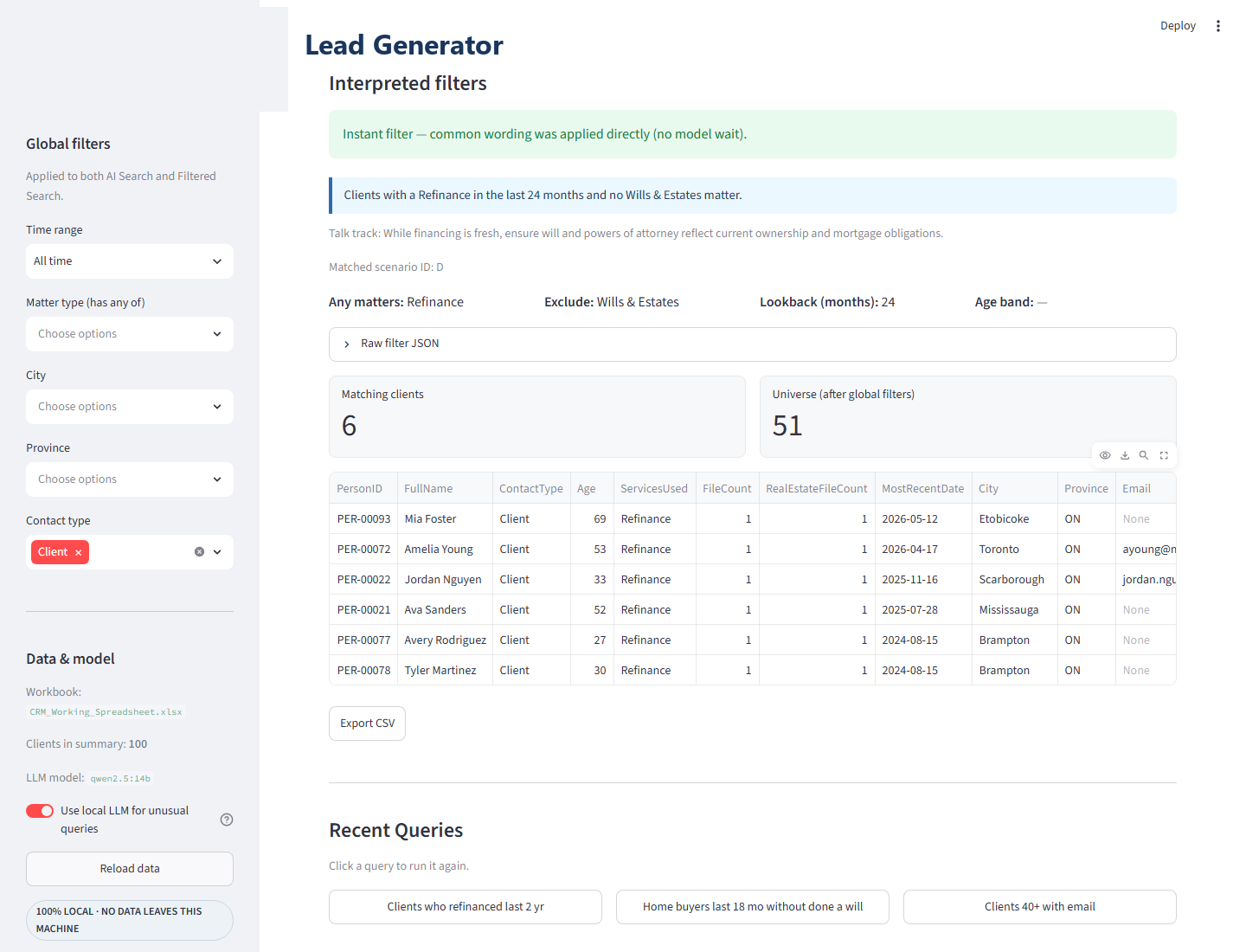
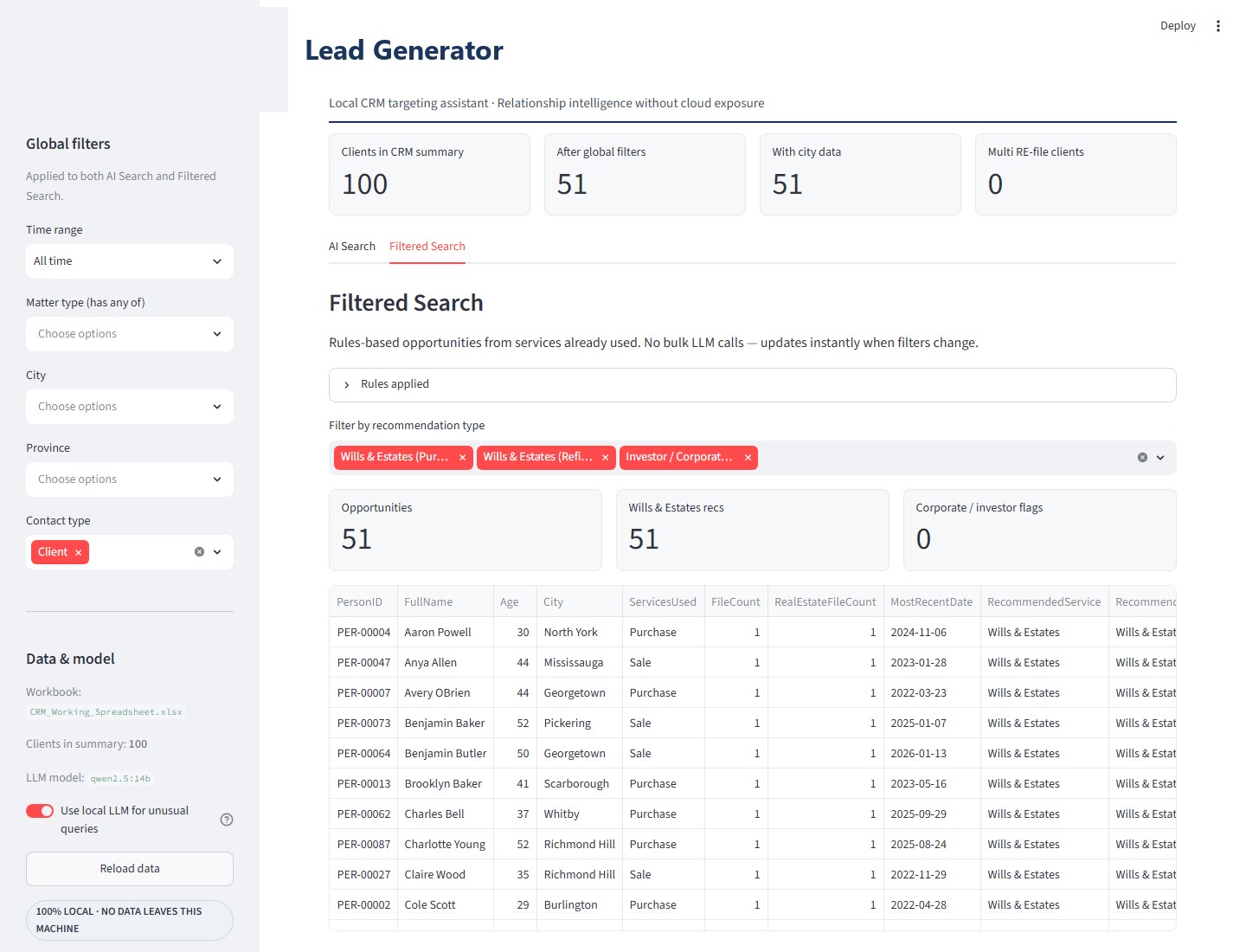
I used Grok Build where it sped up the build. Always with the same constraint: the client’s data path stays local. Tools help ship. I still had to decide what was allowed to ship.
The firm also got an end-user guide, an install guide for the shared CRM folder, a scenario catalogue, and the CRM roadmap. Those are how the work survives after I leave the room.
The longer write-up is the PDF on the Case Studies page. This post is the story around it.
I am studying for the CPMAI (Cognitive Project Management for AI) certification. One pattern it names is hyper-personalization: recommendations for this client, not a one-size message. That is what we aimed for here. I do not claim the credential yet. The studying has been useful because it forces you to name the pattern and bound the use case before you scale the model to every question under the sun.
A simple example. A client in their mid-forties who recently bought or refinanced. The tool does not only say “offer wills.” It can surface a sharper reason. They are in a life stage where their own will and powers of attorney matter, and their parents are often in their sixties or seventies. A natural moment to talk about estate planning for the family, parents included. Same data the firm already holds.
Filtered Search works the same way: recent purchase, refinance, age band, condo, co-owner on title, woven into a short note staff can act on.
We used a local Ollama model so natural language could become structured filters: purchase, last two years, over age forty, no wills matter. Early on, that step was slow. Filtering a hundred rows in a spreadsheet is instant. Waiting on a large local model is not. I watched a simple query sit there for a couple of minutes. That is a hard thing to defend to staff.
So we split it. Common wording runs on a fast path (pattern matching and firm scenario examples) so everyday searches feel like filtering. We keep a scenario library the firm can grow: about a dozen campaign patterns mapped to the data they already have. Purchasers, sellers, refinance, age bands, condos, co-owners, multi-file clients, neighbourhood clusters, referral sources. Staff can add a phrase, or a new campaign, by editing a JSON file. No fine-tuning. Unusual phrasing can still use the local model when it is worth it.
You do not force every click through a fourteen-billion-parameter model. You reserve the model for language, and you make the common path as fast as Excel.
In my work I keep coming back to two tests before a project earns its place. Does this move the firm closer to how it wants to operate, or is it a demo that impresses for a week? And is there a clear outcome, on real data, that staff can use without a research team in the room?
The Lead Generator passed both. It sat on an existing CRM path, produced lists for wills and cross-sell, respected confidentiality, and stood alone as something usable. It also left the door open for later questions on the same local stack. I am not pretending we had already built the whole house.
Do not assume every firm needs a blank-slate AI assessment. Some already have a plan. The best help is often the right module, something staff can use while the foundation keeps growing.
For professional services, local AI is often the difference between a pilot that ships and a pilot that stalls in risk review.
AI without a system of record is theatre. Build on the CRM. Start with something stand-alone enough to deliver now, and open enough (a local model, a JSON file, a roadmap) to expand later.
I help organizations get from a strategy conversation to something staff can actually open, especially when AI is involved and the data is sensitive. I am studying for CPMAI, which has been useful for mapping a real problem to a pattern you can design against, rather than a buzzword.
In a focused engagement I work alongside you to find the highest-leverage module, design for privacy from day one, and ship something people can export and improve as the CRM grows.
Reach out for a quick chat at Suganth@AruviConsultancyServices.com